
Membership Builder with
Built-in AI Assistant.
Tell AccessKit what you need in plain English. Its AI assistant helps create memberships, content restrictions, coupons, emails, team access, and unauthorized pages inside WordPress — fast.
Everything You Need to Grow
AccessKit packs enterprise-grade membership features into one clean, AI-powered plugin. No bloat, no addons.
Teams and Sub-accounts
Teams adds corporate membership functionality to AccessKit, letting a parent member create, manage, and sell sub-accounts for their team, staff, clients, or organization — with full control over what each member can access.
Membership Builder
Launch paid, free, trial, and recurring membership plans faster.
Content Restriction
Protect posts, pages, downloads, Elementor sections, and premium content.
Fully Customizable
Control renewals, forms, emails, redirects, and access messages.
Smart Offers
Create coupons, upgrades, member discounts, and targeted promotions.
Compliance
Add checkout notices, terms, privacy policy, and required agreements.
Teams & Sub-Accounts
Sell team seats, parent accounts, and controlled sub-account access.
Members Directory
Build searchable member profiles, directories, and community listings.
Messaging Board
Let members connect, follow, message, and engage inside your site.
Email Notifications
Automate welcome, renewal, expiry, reminder, and custom emails.
Stripe & PayPal
Accept recurring payments, trials, coupons, and failed-payment recovery.
Elementor Integration
Restrict Elementor sections, widgets, and pages by membership level.
AccessKit AI Assistant
Build your membership site without hiring a developer. Tell AccessKit what you need in plain English, and the AI assistant helps create memberships, content rules, coupons, emails, and access workflows for you.
- Create memberships with natural language prompts
- Auto-build content restriction rules
- Set up coupons, emails, and reminders faster
- Get contextual help across AccessKit admin pages

Fully Customizable
Customize every part of your membership system without custom code. Set renewal dates, payment rules, registration forms, redirects, emails, and access-denied pages exactly how your business needs them.
- Custom renewal dates & billing cycles
- Flexible payment options per membership
- Custom registration forms with field control
- Custom unauthorized messages per rule/membership
- Custom redirections per membership & rule

Teams & Sub-Accounts
Let members invite their team, colleagues, or friends. Sell group access and control exactly what sub-accounts can see.
- Sell free or paid sub-accounts to members
- Charge per sub-account seat
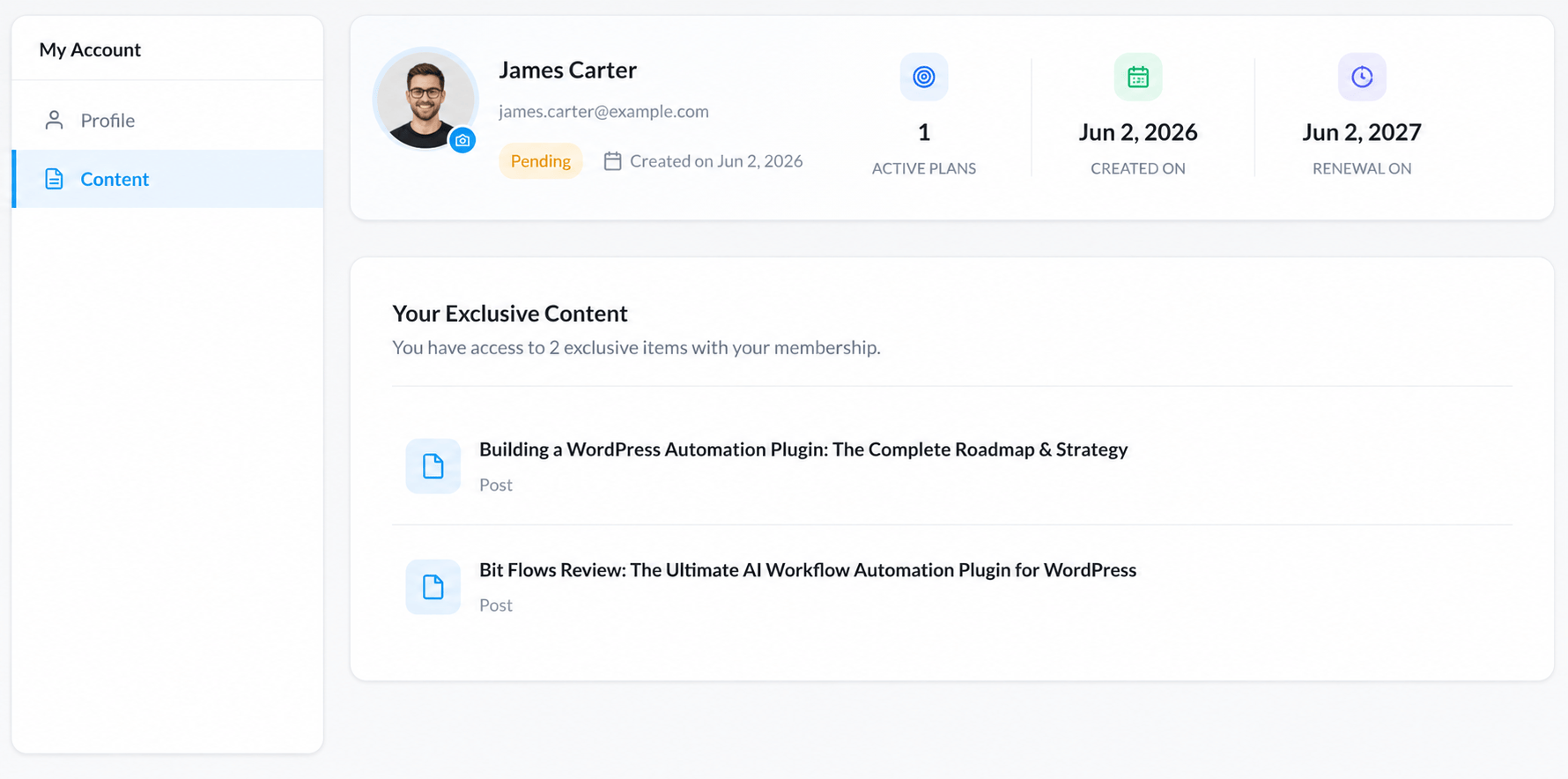
- Provide selected content to sub-accounts only
- Parent account manages team from dashboard

Members Directory
A modern, searchable members directory with profiles, social connections, and a messaging board. Turn your membership site into a thriving community.
- Beautiful member profile pages
- Members can follow, unfollow & connect
- Built-in messaging board for members
- Search & filter members by plan or role

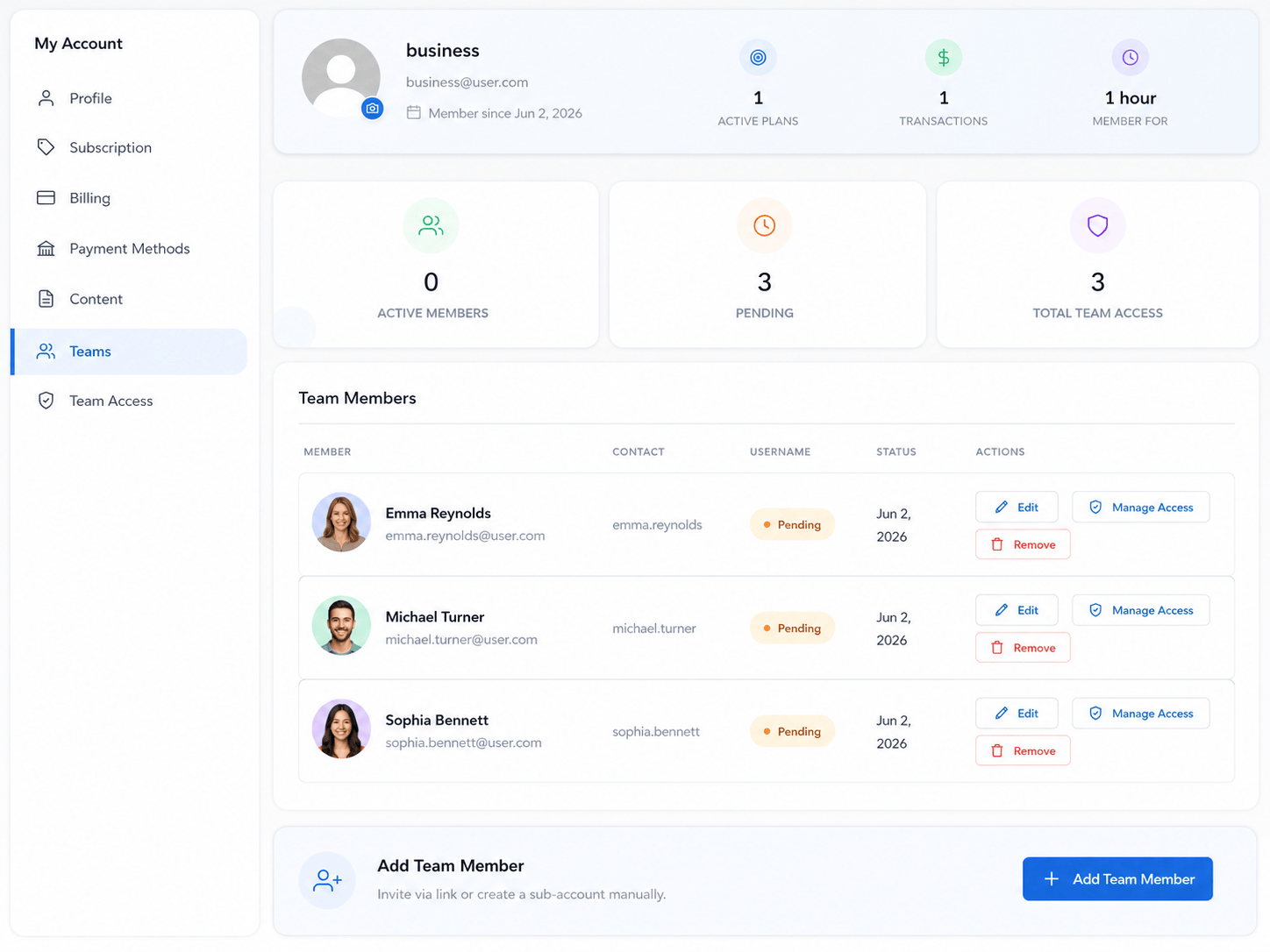
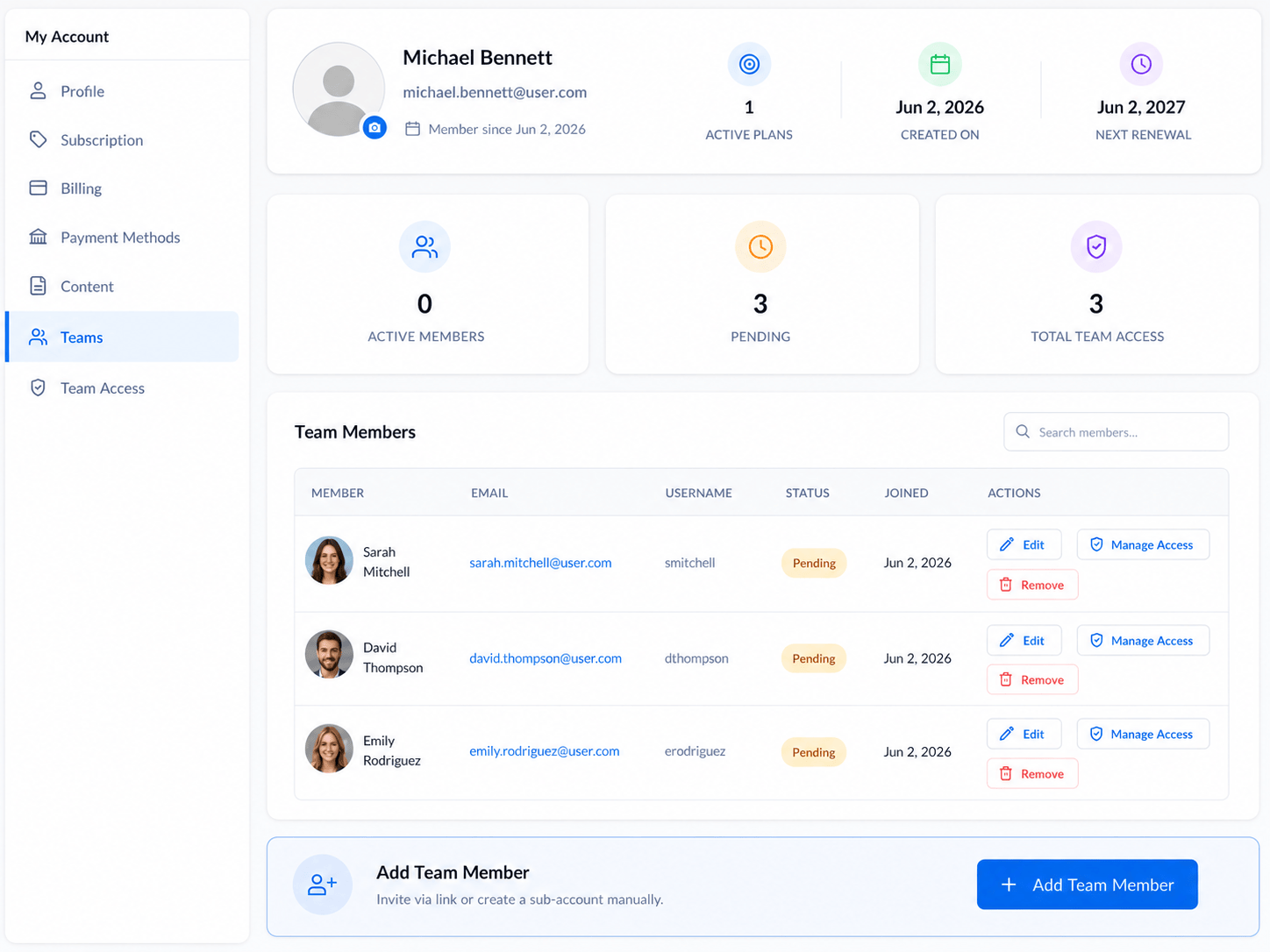
Teams: Corporate Memberships
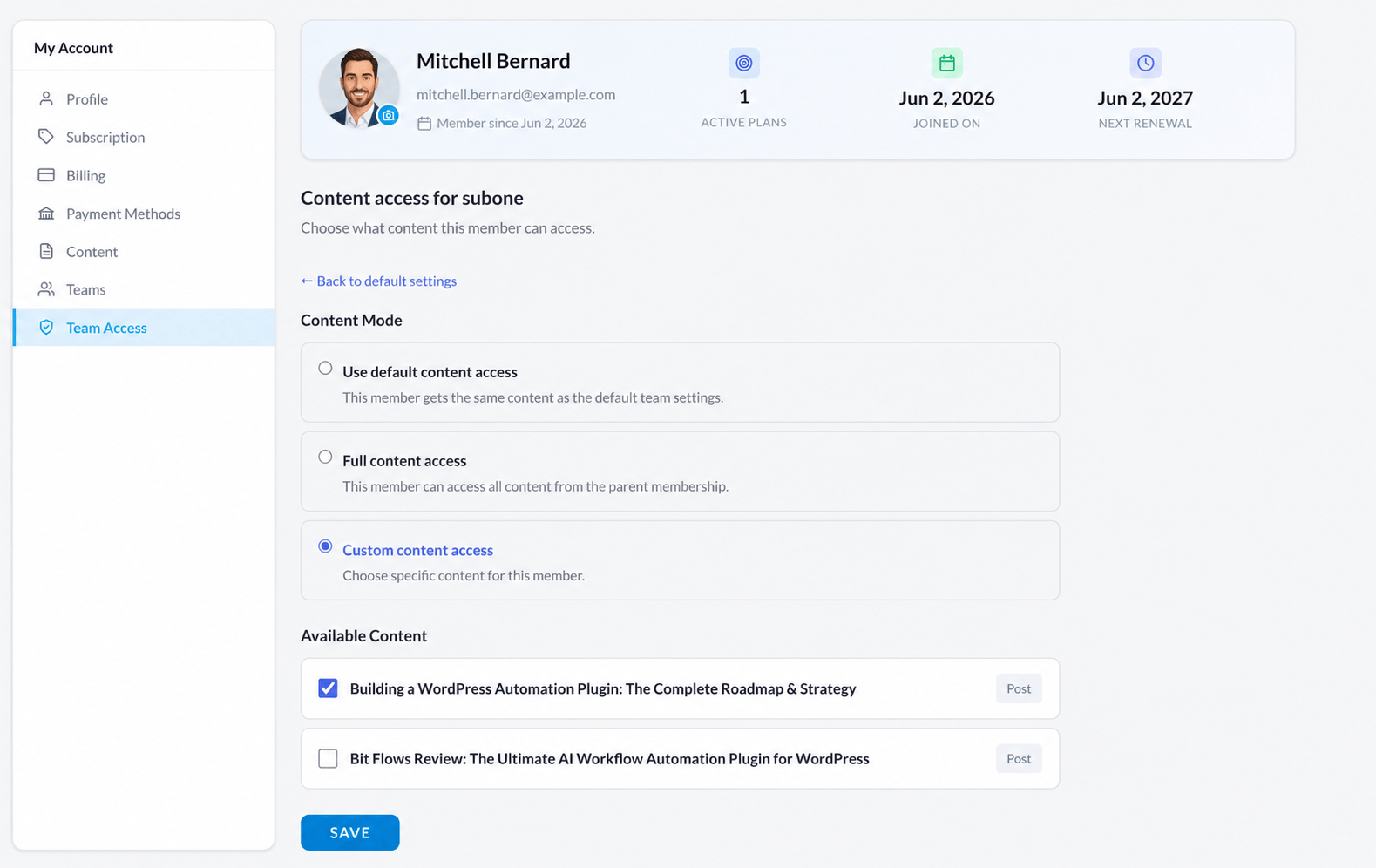
Teams turns AccessKit into a corporate membership system where parent members can add sub-accounts, sell team seats, and control content access for each member individually.
- Create sub-accounts under one parent membership
- Sell team seats or invite members manually
- Set different access rules for every sub-account
- Pause, approve, or mark sub-accounts as pending


Smart Member Messaging Board
CircleKit gives your community a controlled messaging system with AI-powered rules, spam protection, notifications, and member-to-member permissions — so members can connect safely without admin chaos.
- Set member-to-member messaging rules with AI prompts
- Control messaging by membership, role, group, course, or profile type
- Add spam reports, moderation, blocking, and safety controls
- Keep conversations organized with notifications and message history


Simple Pricing, Real Value
Choose the plan that fits your business. Scale up when you need more.
- ✓ Unlimited Memberships
- ✓ 0% Transaction Fee
- ✓ AI Setup Assistant
- ✓ Content Restriction Rules
- ✓ Custom Renewal Date
- ✓ Custom Registration Page
- ✓ WooCommerce Integration
- ✓ Member Directory
- ✓ Drip Content & Emails
- ✓ Coupons & Discounts
- ✓ Email Marketing (Mailchimp+)
- ✓ Invoices & Receipts
- ✓ Priority Support
- ✓ Everything in Core Plan
- ✓ Recurring Subscriptions
- ✓ Add Team Members
- ✓ Sell Sub-accounts
- ✓ add Manually Sub account
- ✓Team Invitation URL
- ✓ Teams account Page
- ✓ Email Marketing (Mailchimp+)
- ✓Custom Access rules
- ✓ Sub-account control
- ✓ Priority Support
- ✓ WhatsApp & Zoom Support
- ✓ 0% Transaction Fee
- ✓ Everything in Scale Plan
- ✓ Lifetime access
- ✓ Single Payment
- ✓ All Future Updates
- ✓ Member Profiles & Directory
- ✓ Member Dashboards
- ✓ Unlimited Uses
- ✓ add Manually Sub account
- ✓Team Invitation URL
- ✓ 0% Transaction Fee
- ✓ WhatsApp & Zoom Support
🚀 Founder Launch Pricing - available for early adopters
Integrations Marketplace
Connect AccessKit with the tools you already use. Automate workflows, sync members, and grow effortlessly.


Frequently Asked Questions
Even with plugins, many businesses end up paying for separate tools:
• Membership plugin: around $250/year
• Teams/corporate accounts add-on: around $200/year
• Community builder: around $400/year
• Form builder: around $150/year
That can reach $1,000/year or more before setup costs.
AccessKit gives you the core membership system for $247/year, with FormsKit Pro included as a gift — helping you reduce plugin costs, developer work, and setup time.
This means fewer plugin conflicts, fewer renewals, less setup complexity, and a cleaner experience for both admins and members.
Instead of buying different tools for memberships, teams, forms, directories, profiles, community, messaging, access rules, and WooCommerce member benefits, AccessKit brings these features together in one WordPress ecosystem.
AccessKit can help replace or reduce the need for:
• Membership builder plugin — create free, paid, recurring, trial, and custom membership plans
• Teams / corporate accounts plugin — sell parent accounts, sub-accounts, team seats, and group access
• Community plugin — add forums, groups, activity feeds, and notifications with CircleKit
• Messaging board plugin — let members message each other with rules, blocking, reporting, and spam protection
• Forms plugin — build registration, profile, onboarding, and member forms with FormsKit Pro included
• User management plugin — manage members, roles, access levels, subscriptions, and account settings
• Member directory plugin — create searchable member directories with grid/list layouts and filters
• Profile builder plugin — let members manage profile details, privacy, visibility, and account info
• Content restriction plugin — protect posts, pages, products, courses, downloads, and custom content
• Coupon / offer plugin — create membership-based coupons, upgrade offers, and special access deals
• WooCommerce discount plugin — give members product discounts and dynamic pricing
• Email notification plugin — send welcome, renewal, expiry, access, and reminder emails
• Access-denied redirect plugin — turn locked content into custom upgrade pages or sales pages
Simple answer: AccessKit helps you replace multiple plugins with one AI-powered membership platform — saving plugin costs, setup time, developer work, and compatibility headaches.
Instead of hiring a developer every time you need a new membership rule or access setup, you can describe what you want and let AccessKit guide the setup inside WordPress.
For example, you can say:
"Create a monthly coaching membership, restrict premium lessons, give members 20% off WooCommerce products, and redirect non-members to an upgrade page."
AccessKit helps turn that into a real membership setup.
For example, if someone joins on May 8, you can still set the next monthly renewal to June 1. For yearly memberships, you can set renewals to a fixed yearly date such as June 1, 2027.
This is useful for schools, academies, associations, coaching programs, cohort-based memberships, and businesses that want predictable billing cycles.
That means when someone clicks locked content, they do not just see an error. They can see a targeted sales page explaining why they should upgrade or buy the right membership.
This turns restricted content into a conversion opportunity.
You can create messages or pages based on:
• Membership level
• Restriction rule
• Individual content item
So a locked course, private download, WooCommerce product, and premium article can each have a different access-denied message or upgrade page.
A parent member can collect payment through connected Stripe or PayPal accounts, or manage payments offline depending on your setup.
This allows your members to resell seats, manage their own users, and create a real team-based membership business.
Instead of every sub-account automatically getting the same access as the parent, parent members can choose which content, courses, groups, or resources each sub-account can access.
This is powerful for companies, agencies, schools, coaches, and team training programs.
This is useful for selling access to businesses, organizations, schools, coaching groups, agencies, or any buyer who needs to give access to multiple people.
You can sell membership-connected products, give member-only discounts, restrict products by membership level, and create WooCommerce benefits for active members.
For example, active members can receive special pricing, VIP discounts, product access, or exclusive offers based on their membership level.
This helps increase store revenue and gives customers a stronger reason to stay subscribed.
You can create private stores, VIP product areas, member-only downloads, wholesale access, course material shops, or exclusive product catalogs.
This helps you build professional member directories for communities, schools, business networks, coaching programs, and private membership sites.
For example, a member may choose to show their name and bio, but hide their phone number or email address.
This gives members more privacy and makes your platform feel safer and more professional.
The goal is to give membership sites a clean community layer without unnecessary bloat or confusing setup.
• Public groups can be visible and open.
• Private groups can appear in the directory but require invitation or approval.
• Hidden groups are not shown in the directory and can only be accessed by selected members.
This gives you full control over how community spaces are discovered and joined.
This means you can create private discussion spaces for specific memberships, LearnDash courses, TutorLMS courses, LifterLMS courses, cohorts, teams, or premium communities.
You can control messaging by membership, role, group, course, profile field, gender, or specific member permissions.
This helps create a safer community and prevents unrestricted messaging chaos.
Members can report unwanted messages, block users, and manage their communication preferences, while admins keep control over the community environment.
This creates a better user experience and helps members stay engaged.
The more value members see inside their dashboard and community, the more likely they are to stay subscribed.
This is useful for coaching, private client portals, custom training, special resources, and one-to-one access workflows.
You can connect memberships with courses, restrict learning content, create course-based groups, and give members access to educational resources based on their plan.
You save money, reduce complexity, avoid plugin overload, and launch faster.
Ready to Build Your
Membership Site?
Get AccessKit and start building memberships with the power of AI. Launch your membership site today.
